How Visual Search Boosts Cross-Selling

How Visual Search Boosts Cross-Selling
Visual search is reshaping how online stores increase sales by making product discovery faster and more intuitive. Instead of typing keywords, shoppers upload photos, and AI instantly suggests matching or complementary items. This approach not only simplifies shopping but also drives higher Average Order Value (AOV) by recommending related products like accessories or add-ons.
For example:
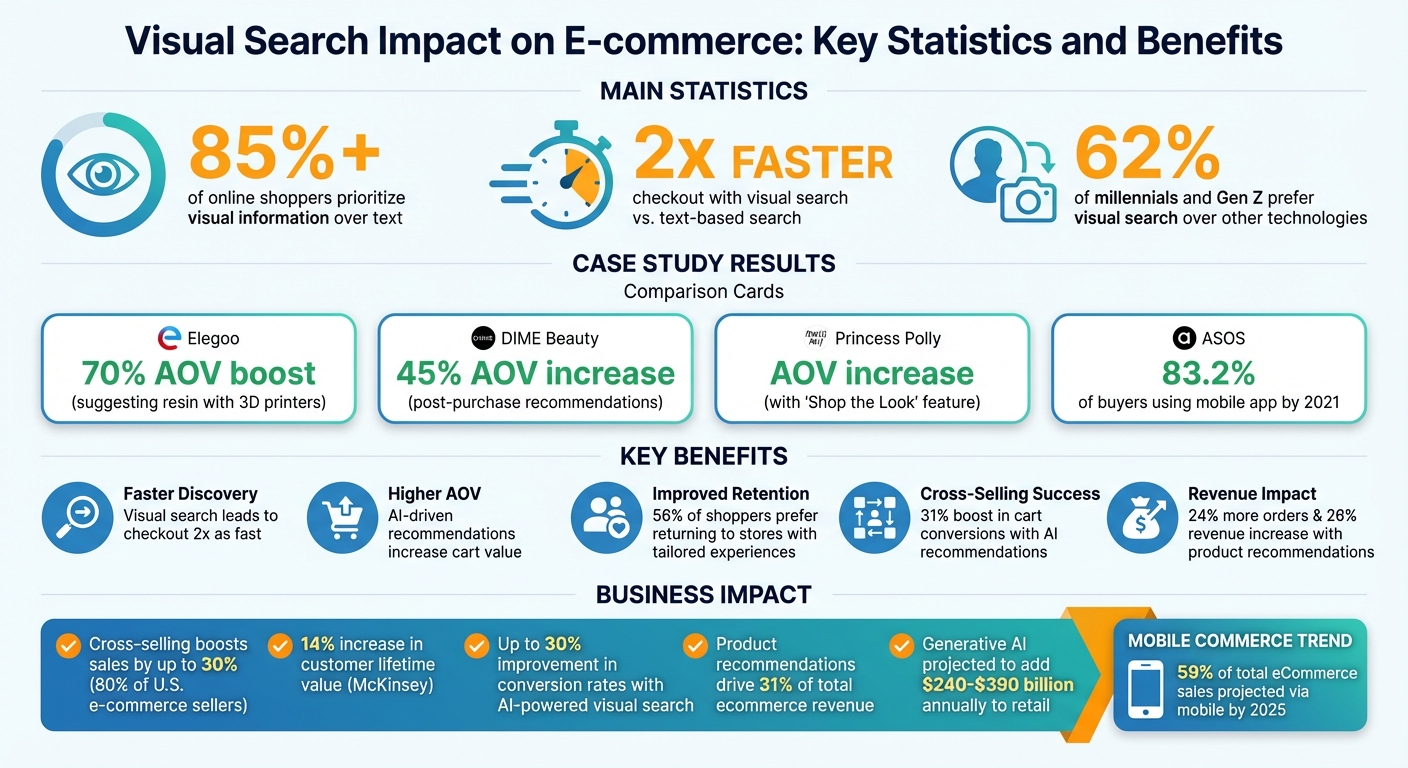
- Elegoo saw a 70% AOV boost by suggesting resin with 3D printers.
- DIME Beauty achieved a 45% AOV increase using post-purchase recommendations.
Visual search uses AI to analyze product images based on color, style, and shape, offering personalized suggestions without manual setup. Tools like sImage make it easy for Shopify stores to implement this technology, helping stores reduce bounce rates, improve engagement, and increase sales.
Key benefits:
- Faster discovery: Visual search leads to checkout twice as fast as text-based search.
- Higher AOV: AI-driven recommendations encourage customers to add more to their carts.
- Improved retention: 56% of shoppers prefer returning to stores offering tailored experiences.
Getting started with sImage is simple, with plans starting at $6/month. High-quality product images and strategic placement of recommendations can further enhance results. Visual search isn’t just a tool - it’s a proven way to boost sales and improve the shopping experience.
Visual Search Impact on E-commerce: Key Statistics and Benefits
What Visual Search and Cross-Selling Mean for Your Store
Visual Search Explained
Visual search allows shoppers to find what they’re looking for by uploading an image rather than typing keywords. Instead of struggling to describe a specific style or product, users can simply upload a picture, and AI technology takes care of the rest - analyzing the image to identify matching or similar products in your store.
This process relies on two key methods: image metadata scanning and reverse image retrieval. These techniques use AI to evaluate colors, shapes, and patterns, ensuring accurate matches. At the heart of this technology is computer vision, which enables machines to interpret visual content in a way that mimics human perception. By breaking down an image into its core details, AI can deliver results that align closely with what customers are looking for.
And it’s working - visual search resonates strongly with younger, visually driven shoppers. In fact, 62% of millennials and Gen Z consumers prefer this method over traditional keyword searches.
How Visual Search Enables Cross-Selling
The advanced capabilities of visual search don’t just stop at finding a single product. They also open up new opportunities for cross-selling by identifying visually complementary items. For example, if a customer is browsing a dress, AI can suggest matching accessories, shoes, or jewelry that align with the dress’s color, style, or overall vibe. The best part? This happens without the need for manual tagging or complicated setup.
By focusing on visual attributes, visual search eliminates the clutter and guesswork often associated with text-based searches. It hones in on the customer’s preferences, making the shopping experience smoother and more personalized. As Wanda Gierhart, former Chief Marketing Officer at Neiman Marcus, put it:
Visual search removes hurdles, taking the customer directly from inspiration to gratification.
Real-world applications showcase how effective this technology can be. Take ASOS, for instance. In 2018, they introduced StyleMatch, a tool that lets users upload a photo to find either the exact item or visually similar options. By 2021, 83.2% of ASOS buyers were using the mobile app to access their catalog, highlighting the tool’s influence. Similarly, Target partnered with Pinterest Lens in 2017, allowing customers to snap photos of in-store items and instantly view similar or complementary products online.
These examples underscore how visual search not only enhances the shopping experience but also drives additional sales through smart, visually driven recommendations.
How to Use sImage for Cross-Selling
Step 1: Install sImage from the Shopify App Store

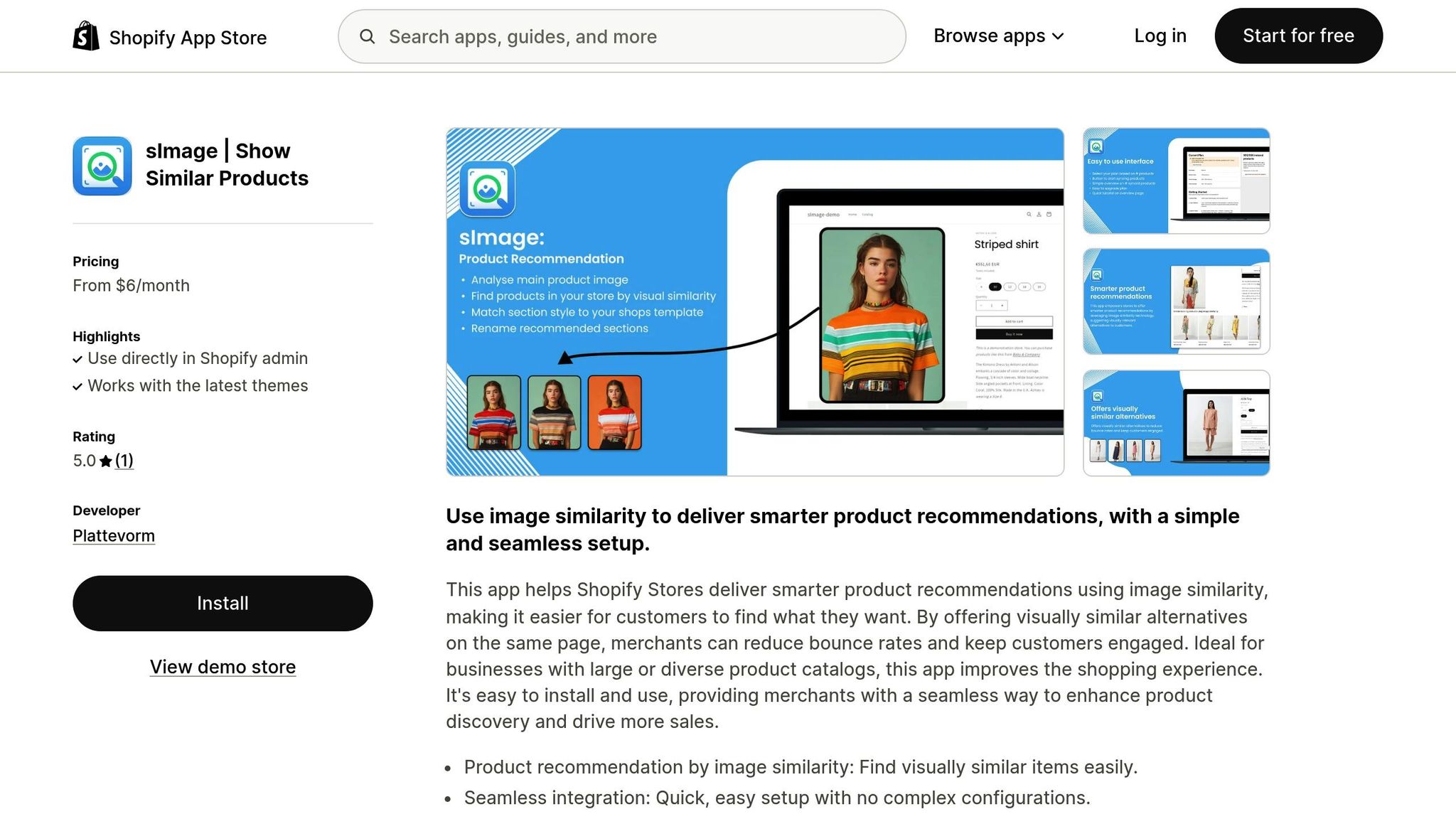
Getting started with sImage is quick and easy. Visit the Shopify App Store, search for "sImage", and click the install button. The one-click installation works instantly with your current Shopify theme - no coding required. It’s designed to integrate smoothly with modern Shopify themes, saving you time and effort.
Once installed, sImage’s AI gets to work by analyzing your product catalog. It identifies visual patterns across your inventory without requiring any manual tagging. This means you can immediately start offering visually relevant product recommendations, helping customers discover complementary items based on what they’re already browsing. After installation, you just need to configure the settings to activate these recommendations.
Step 2: Configure sImage for Product Recommendations
After installation, the next step is to select a subscription plan that fits your store’s catalog size. sImage offers straightforward pricing:
- Small: $6/month (up to 500 products)
- Medium: $11/month (up to 1,000 products)
- Large: $20/month (up to 2,000 products)
- Pro: $35/month (up to 4,000 products)
- Champion: $60/month (up to 8,000 products)
Choose a plan that covers your entire product range to ensure the AI can analyze every item for cross-selling opportunities.
sImage automatically displays visually similar product recommendations on your product pages. These recommendations are strategically placed, so when customers view a product, they also see related items that match its style, color, or aesthetic. This not only keeps shoppers engaged but also provides alternatives if their original choice is unavailable. It’s a smart way to reduce bounce rates and create new sales opportunities.
Step 3: Prepare Product Images for Better Accuracy
The quality of your product images plays a crucial role in how effectively the AI identifies visual similarities. High-resolution images that clearly showcase your products are essential. Blurry or poorly lit photos can make it harder for the system to generate accurate matches.
Whenever possible, include multiple angles of each product - front, back, side views, or even 360-degree videos. This additional data allows the AI to make more precise recommendations. Additionally, ensure your images include descriptive alt text and SEO-friendly file names. For instance, instead of using a generic file name like "IMG_123.jpg", opt for something like "navy-blue-suede-loafers.jpg." This helps the AI better understand the context and attributes of your products.
Step 4: Customize Visual Recommendations
While sImage starts working automatically after setup, you can tweak how recommendations appear on your product pages to maximize their impact. The app is especially useful for visually-driven industries like clothing, art, and home decor, where customers often shop based on appearance rather than text-based searches.
Monitor where recommendations are placed and how customers interact with them. AI-powered recommendations have been shown to boost cart conversions by 31% when positioned prominently. Adjusting the placement of these suggestions can significantly increase your average order value.
Here’s what The Dutch Tile Project, a Shopify merchant using sImage, had to say:
"This app has been a game-changer for my Shopify store! The 'similar items by image' functionality has improved customer experience significantly by offering visually relevant product recommendations. Since implementing this app, I've noticed a reduction in bounce rates and an increase in sales from upselling and cross-selling."
Benefits of Visual Search for Shopify Stores
Make Product Discovery Easier for Customers
Visual search simplifies the way customers find products. Instead of typing out detailed descriptions like "navy blue suede loafers with brown soles", shoppers can upload a photo. This approach resonates with modern consumers - over 85% of online shoppers prioritize visual information over text when purchasing items like clothing or furniture, and visual search leads to checkout twice as fast as text-based search.
By analyzing features like color, shape, and pattern, AI pinpoints products that match the uploaded image, cutting down on effort and showing customers exactly what they’re looking for.
When ASOS introduced its "StyleMatch" feature in 2018, Andy Berks, their Digital Product Director, highlighted its convenience:
Inspiration can strike you anywhere and at any time. With just a couple of taps of their mobile device, ASOS customers can capture that fleeting moment and instantly search our product lines.
By 2021, 83.2% of ASOS customers were browsing via mobile, making visual search a crucial tool for product discovery. This ease of use not only helps customers find what they need but also encourages them to explore more, often leading to higher order values.
Increase Average Order Value with AI Recommendations
Visual search doesn’t just make shopping easier - it also drives sales. When customers upload a product image, AI can suggest complementary items that match the style, colors, or overall aesthetic. For example, Princess Polly’s "Shop the Look" feature allows shoppers to view and purchase entire outfits based on a single image, leading to a noticeable boost in average order value.
These tailored recommendations often encourage customers to add items they might not have considered on their own. According to McKinsey, businesses using cross-selling strategies have seen a 14% increase in customer lifetime value. Beyond increasing sales, these personalized suggestions create a more engaging shopping experience, keeping customers interested and satisfied.
Improve Customer Engagement and Retention
Personalized visual search doesn’t just improve product discovery - it strengthens the connection between customers and your store. 56% of shoppers say they’re more likely to return after a tailored shopping experience. By analyzing image metadata like colors, shapes, and patterns, visual search can suggest items that align with each shopper’s preferences, blending in-store and online experiences seamlessly.
Take Target, for instance. In 2017, they integrated Pinterest Lens into their mobile app, allowing users to snap photos of physical products and find similar options online. This not only expanded their inventory beyond what was available in-store but also gave customers more choices without leaving the aisle.
Neiman Marcus experienced similar success. Initially launching visual search for women’s shoes and handbags, they expanded it across their entire catalog after seeing strong sales results. Wanda Gierhart, their former Chief Marketing Officer, summed it up:
Visual search removes hurdles, taking the customer directly from inspiration to gratification.
With 62% of millennials and Gen Z preferring visual search over other new technologies, and mobile commerce projected to account for 59% of total eCommerce sales by 2025, visual search is quickly becoming a must-have for retailers aiming to stay competitive and meet evolving customer expectations.
sbb-itb-521eef9
Measure and Improve Visual Search Performance with sImage
Track Key Metrics for Cross-Selling Success
Before making changes to your sImage settings, collect a four-week baseline to ensure you have accurate comparison data. Focus on metrics that directly tie to cross-selling performance. For instance, Average Order Value (AOV) helps determine if visual recommendations are encouraging shoppers to add more items to their carts. Meanwhile, the search-to-cart rate reveals how effectively visual discovery translates into purchases.
Ben Mouncer from Shopify highlights how straightforward it is to track visual search results:
Visual search performance is something retailers can track and measure easily. If a customer uses visual search and goes on to buy that product... it's easy to trace that sale back.
In addition to these metrics, monitor clicks on "Similar Items" and bounce rates to get a clearer picture of shopper engagement.
| KPI Category | Specific Metric | Insights |
|---|---|---|
| Order Value | Average Order Value (AOV) | Measures if cross-sells increase items per transaction |
| Conversion | Search-to-Cart Rate | Tracks how quickly visual discovery leads to purchase |
| Engagement | Click-Through Rate (CTR) | Shows how often shoppers interact with "Similar Items" |
| Retention | Repeat Purchase Rate | Indicates if personalized discovery fosters loyalty |
| Efficiency | Bounce Rate | Reflects whether recommendations keep users on-site |
To evaluate ROI, calculate your payback period by dividing the additional revenue generated by your monthly sImage costs. Aim for a payback period of less than 12 months. Keep in mind that product recommendations drive 31% of total ecommerce revenue, with implementations often leading to 24% more orders and a 26% revenue increase.
These metrics not only act as benchmarks but also guide your A/B testing and help refine your visual search strategy.
Test and Refine Visual Search Recommendations
To measure the impact of sImage, conduct a 50/50 A/B test. Present one group with AI-powered recommendations through sImage, while the other group sees manual or no recommendations. This method isolates the sales lift directly attributable to visual search. Use the metrics you’re tracking to identify which placements drive the most engagement and conversions. For example, during Black Friday 2024, retailers using AI-powered tools experienced a 15% increase in conversion rates, underscoring the value of optimization.
Experiment with different placement locations for your visual cross-sell blocks. You could include them on product pages as "Pairs well with" sections, display them in homepage carousels, or even feature them at checkout. Each placement targets unique discovery moments and can produce varying results.
Don’t forget to audit your product images regularly - pay attention to size, format, and alt text. High-quality images enhance AI accuracy and improve recommendations.
Lastly, analyze which product attributes, such as colors, shapes, or materials, drive the most cross-selling success. Use this insight to optimize your product photography and catalog organization around these high-performing patterns. This approach ensures your visual search strategy remains efficient and impactful.
Visual Search: hi, tech. Explains
Conclusion
Visual search isn’t just a buzzword - it’s a game-changer for e-commerce. Over 85% of online shoppers value visual information more than text when purchasing products like clothing or furniture, and visual search offers checkout experiences that are twice as fast.
With these advantages in mind, sImage takes things further by simplifying cross-selling. By automatically suggesting visually similar products, it creates natural opportunities to recommend additional items in a way that feels helpful, not pushy. The results speak for themselves: 80% of U.S. e-commerce sellers say cross-selling has boosted their sales by up to 30%, and retailers using AI-powered visual search often see conversion rate improvements of up to 30%. sImage taps into these trends to deliver personalized recommendations that truly connect with today’s visually-driven shoppers.
Getting started with sImage is easy - no coding required. Pricing starts at just $6/month for smaller catalogs, and even the free plan supports up to 100 products. Once installed, sImage works seamlessly in the background, analyzing your product images to surface relevant recommendations that keep customers engaged and coming back for more.
Ready to take your store to the next level? Install sImage, optimize your images, and start tracking key metrics like average order value (AOV) and search-to-cart rates. The insights you gather will not only refine your strategy but also prove how visual search can transform your business.
With generative AI projected to add $240–$390 billion annually to the retail sector, adopting visual search now could be the competitive edge your Shopify store needs.
FAQs
How can visual search help increase cross-selling opportunities?
Visual search leverages AI to examine product images, pinpointing details like style, color, and texture. From there, it suggests visually similar or complementary items, which can appear on product pages, in shopping carts, or even during follow-up interactions after a purchase.
These personalized recommendations feel highly relevant to shoppers, enticing them to browse and discover more items. As a result, visual search can significantly improve click-through rates, increase conversions, and raise the average order value for your store.
How can I set up sImage in my Shopify store?
Setting up sImage in your Shopify store is simple and doesn’t require any coding skills. Here’s how to get started:
- Install the sImage app: Head to your Shopify admin, click on Apps, and select Visit Shopify App Store. Search for sImage, then add it to your store.
- Allow permissions: During installation, grant sImage access to your product catalog so it can analyze your images effectively.
- Automatic processing: Once installed, the app will scan your product photos and identify visually similar items based on attributes like color, texture, and style.
- Customize recommendations: Use the sImage dashboard to decide where product suggestions will appear - on product pages, in the cart, or after purchase. Save your preferences, and the recommendations will go live instantly.
You can track how sImage performs through Shopify analytics or the app’s reporting panel. Pricing starts at $6.00 USD per month, with updates that adapt as your inventory changes.
How do I optimize product images to improve AI visual search results?
To get the most out of AI visual search tools like sImage, your product images need to be clear, detailed, and visually striking. High-quality visuals not only help the AI match products more accurately but also open up better cross-selling opportunities.
- Use high-resolution images to highlight the product's color, texture, and design details.
- Stick to a neutral background with consistent lighting to keep the product front and center.
- Show multiple angles and close-up shots to give the AI plenty of detail for precise matching.
- Optimize for mobile viewing by ensuring images load quickly and look great on smaller screens.
By following these tips, you'll make it easier for sImage to analyze your visuals, leading to more relevant recommendations and, ultimately, increased sales.